

Weather
Weather Radar Team
I usually judge a weather app by one simple question: can I open it, understand what is happening outside, and make a sensible plan without sorting through clutter? Weather, developed by Weather Radar Team, aims to do exactly that with a focus on changing conditions such as thunderstorms, rain, and snow. It is a free weather app for Android, rated for Everyone, and it feels designed for people who want a quick answer rather than a complicated meteorological dashboard.
My first impression is that its appeal comes from directness. You are not installing a social network, a news service, or a collection of lifestyle tools. You are installing a forecast companion. That narrow purpose is useful when I need to know whether I can walk to the store, leave laundry outside, drive across town, or take a jacket before heading out. The app has been available since September 27, 2017, and its current version is 7.7.8, so it is not a brand-new experiment that still feels unfinished.
The app has built a substantial audience, with more than ten million installs and an average rating of 4.5 from roughly 233 thousand ratings. Those figures do not guarantee that it will suit every person, but they do suggest that its basic approach works for many users. I would describe it as a practical choice for everyday forecasting, especially if your main concern is noticing incoming bad weather rather than studying detailed climate information.
Getting from installation to a useful forecast
What to expect when you open it
A first-time user should expect a straightforward weather experience rather than a tutorial-heavy one. The central task is choosing or viewing a location and then reading the forecast around that place. The store description highlights thunderstorm, rain, and snowfall forecasting, which gives a good idea of the app's personality: it is particularly relevant when conditions may interrupt ordinary plans.
I find that focus more useful than a screen packed with every possible atmospheric detail. When the sky looks uncertain, I want the answer to be visible quickly. Is rain likely soon? Is a storm developing? Is snow part of the outlook? Weather is at its best when it helps me make that decision without requiring specialist knowledge.
Related News

Instagram Is No Longer a Photo App. It Is an Attention Engine

Microsoft Teams Mobile: When Collaboration Becomes Navigation

How the NFL App Adapts to Android and iOS Updates

Temu: Elevate Your Shopping Experience to Billionaire Status

Why Traffic Rider Works Best as a Precision Reflex Game

How Google’s Find Hub Transforms Everyday Searches
That simplicity also sets a reasonable expectation. This is not the app I would choose as my only tool for professional outdoor operations, scientific observation, or detailed long-range planning. A general forecast can guide a commute or a weekend errand, but unusual local conditions can change quickly. I treat the app as a practical indication of what to expect, not as a guarantee that every minute of the day will unfold exactly as shown.
The first setup: keep the location choice deliberate
After installation, I recommend starting with one location you genuinely care about instead of immediately trying to build a long list of places. For most people, that is home, work, school, or the place they visit most often. A focused starting point makes the forecast easier to interpret and avoids turning the first screen into a collection of places that are rarely relevant.
Location selection deserves a little attention because a forecast is only useful when it represents the correct area. If you are planning a trip, check the destination separately rather than assuming that the weather near your home will be similar. This is one of the easiest mistakes to make with any weather app: the forecast may be accurate for the selected place while still being completely unhelpful for where you are actually going.
Gallery
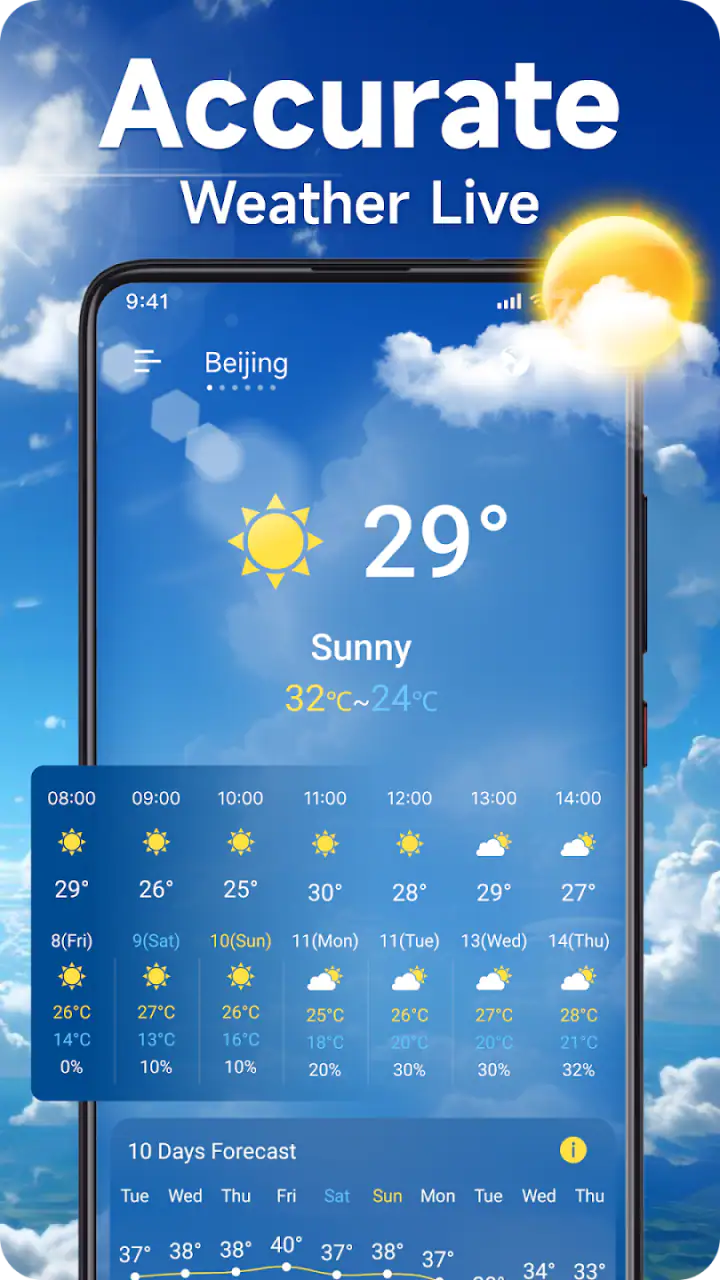
I also suggest opening the app in two different situations during the first day: once when the weather is calm and again when conditions are changing. The calm check helps you learn the layout without pressure. The second check shows whether the information you care about is easy to find when rain or a storm is approaching. That small test is more useful than simply deciding whether the interface looks attractive.
Your first successful action
The first meaningful success is not merely seeing a temperature or a weather symbol. It is using the forecast to make a decision. For example, before leaving for a walk, I would check the selected location, look for signs of rain or thunderstorms, and decide whether to go now, carry protection, or postpone the trip. That workflow turns the app from a passive display into something genuinely useful.
A good habit is to compare what you see in the app with the sky outside over several ordinary days. I am not suggesting that you manually score every forecast. Instead, notice whether the broad pattern is helpful: does it warn you when a wet period is approaching, and does it distinguish a calm day from a more unsettled one? This kind of personal calibration helps you learn how much confidence to place in the information for your own area.
Snow deserves a similar practical approach. If snow is expected, the important question may not be the exact wording of the forecast but what it means for your routine. A school run, a commute, or an early appointment may require more preparation than a normal rainy day. I use the app as an early reminder to check plans, allow extra time, and look again closer to departure.
A realistic everyday routine
Imagine that I need to leave home for a short drive in the afternoon. The morning sky is clear, so it would be easy to ignore the forecast. Before leaving, I open Weather, check the location, and look specifically for signs of a thunderstorm or rain later in the day. If the outlook has changed, I can move an outdoor task earlier, take suitable clothing, or avoid being caught far from shelter.
This is where the app's narrow purpose becomes a strength. I do not need to read a long article about the weather. I need a quick, location-focused check that supports a decision. The same routine works before gardening, cycling, walking a dog, attending an outdoor event, or driving to a nearby town. The value is not in opening the app constantly; it is in checking at the moments when weather could affect your plan.
For families, I would make the forecast part of the evening routine. A quick look before preparing for the next day can help with clothing, travel, and outdoor activities. For commuters, checking shortly before leaving is more useful than relying only on a forecast viewed many hours earlier. Weather changes, so the best workflow is to use the app as a timely reminder rather than a once-a-day ritual that never gets revisited.
Common confusion and how I handle it
The most common misunderstanding with a weather app is treating a forecast icon as a complete explanation. A rain symbol may be enough to tell me to carry an umbrella, but it does not automatically answer whether rain will arrive before I leave, whether it will last all afternoon, or whether conditions at my destination will match those at home. I always connect the displayed forecast to a specific decision and a specific location.
Another point of confusion is the difference between a general outlook and a warning that conditions are dangerous. I would not use a normal weather screen as a substitute for official emergency instructions during severe storms, flooding, or other hazardous events. If authorities issue alerts, those instructions should take priority. Weather can help me notice that conditions are becoming concerning, but safety decisions need more than a glance at an app.
People also sometimes expect every weather app to behave like a radar application. The name and category may encourage that assumption, but the important question is whether the information presented matches the way you plan to use it. If you specifically need to watch a moving rain band on a map, compare several radar layers, or investigate storm development in detail, a dedicated radar service may be a better fit. If you mainly want a clear forecast for daily decisions, a simpler app can be less tiring.
There is also a practical trade-off around the free model. Weather is free to download and use, while in-app purchases range from $0.99 to $9.49 per item. I would begin with the free experience and decide whether it already covers my routine before considering any optional purchase. That approach avoids paying for extras before I know whether they solve a real problem for me.
Three habits that make the app more useful
First, I would create a small checking routine around weather-sensitive activities instead of opening the app randomly. Check before leaving, check before starting an outdoor task, and check again when a storm or snowfall is expected. This reduces the chance of relying on an old forecast while avoiding unnecessary screen time.
Second, I would separate the forecast question from the clothing question. The app may tell me that rain or snow is expected, but I still need to consider how long I will be outside, whether I can reach shelter, and whether children or pets are coming along. This sounds obvious, yet it prevents the common mistake of treating one weather symbol as a complete plan.
Third, I would use destination-based thinking. When travelling across a city or between nearby towns, the weather can feel different enough to affect the journey. I check the place where I will spend time, not only the place where I am starting. That is a small workflow change, but it makes a general weather app much more useful for day trips and appointments.
Who should use it, and who should skip it?
I think Weather is a good match for first-time weather-app users, busy commuters, families planning ordinary days, and anyone who wants a quick view of rain, thunderstorms, or snowfall. Its Everyone content rating also makes it suitable for a broad household audience. The free entry point lowers the risk of trying it, and the long presence on the platform gives it a more established feel than an unknown new download.
I would be more cautious about recommending it as the only weather tool for people whose work depends on highly detailed, specialised information. Pilots, professional event planners, emergency teams, and outdoor workers may need advanced maps, official alerts, historical records, or specialised forecasting products. A general app can still be convenient for a quick glance, but convenience should not replace the tools required by a high-risk job.
I would also suggest looking elsewhere if you strongly prefer a minimal widget, a fully customisable dashboard, or a radar-first experience. Different users define “simple” differently. For me, a focused forecast is helpful; for someone else, the lack of a particular visual layer or workflow could become frustrating. The right choice depends less on the number of features than on whether the app answers your most frequent weather question quickly.
How it compares with familiar alternatives
Compared with the weather panel already included on many phones, Weather is worth considering if you want a dedicated place to check forecasts rather than a small glanceable element. Built-in tools are convenient because they require no separate installation, but a dedicated app can feel more intentional when weather plays a regular role in your decisions.
Compared with a radar-focused app, Weather is likely to appeal more to someone who wants the forecast explained in everyday terms than to someone who enjoys tracking cloud movement minute by minute. Radar is excellent for answering “what is approaching right now?” A broader forecast is better for “what should I prepare for later?” I would choose between them based on that distinction, and I can imagine keeping both if weather is important to my routine.
Compared with a news-based weather service, this app's advantage is focus. News apps may combine forecasts with articles, videos, warnings, and regional coverage, which can be useful but can also slow down a quick check. Weather makes more sense when I want to open one dedicated tool and get back to my day.
What the numbers say about its place in the category
The app has around 1.3 thousand written reviews alongside its much larger pool of ratings. I read that combination as a sign that many people are comfortable giving a quick evaluation even if they do not leave a detailed explanation. The average of 4.5 is encouraging, but I would still judge the app through my own local use because weather quality can feel different from one region to another.
Its minimum operating requirement is Android 7.0, which makes it accessible to users who are not running the newest phone software. That matters if you keep an older device as a spare or do not upgrade frequently. The current release, 7.7.8, is the version I would look for when installing, since using the current version is generally the sensible way to evaluate the app's present experience.
My next step after the first day
After the first successful check, I would not spend time exploring every screen just for the sake of it. I would use the app for a week around real activities: commuting, shopping, exercise, and one outdoor plan. During that period, I would notice whether the forecast is easy to read, whether the location stays correct, and whether the information arrives in time to change my decision.
If the app consistently helps me avoid being caught in rain or prepare for snow, it has earned a place on my phone. If I find myself needing detailed storm movement, specialist warnings, or a different presentation, I would pair it with or replace it with a more specialised service. That is not a failure; it is simply the difference between a dependable everyday forecast and a professional weather toolkit.
My overall view is positive because Weather understands a useful truth: most people do not need a weather lecture every time they open an app. They need enough clear information to make the next decision. Weather Radar Team has built an accessible, free option with a strong focus on thunderstorm, rain, and snowfall conditions, and its broad audience reflects that practical appeal.
My recommendation is to try it as a daily forecast companion, not as an all-purpose emergency or professional forecasting system. Start with one important location, test it against your actual routine, and use it before weather-sensitive plans. If that simple path gives you the answers you need, this app is an easy one to keep. If your needs revolve around detailed radar or specialised alerts, choose a tool built around those requirements instead.
For a first-time user, the reassuring part is that there is no need to master weather terminology before getting value from it. Pick the right place, check the conditions that could disrupt your plans, and turn the forecast into a practical action. That is where Weather works best: as a small, approachable step between looking out the window and making a better-informed day.
FAQs for Weather
What features does the Weather app offer?
The Weather app provides real-time weather updates, forecasts for up to 10 days, and severe weather alerts. It includes a radar map feature, detailed hourly forecasts, and customizable notifications to keep you informed about changing conditions. The app also offers widgets for quick access to weather data on your home screen.
How accurate is the Weather app's forecast?
The Weather app pulls data from multiple reliable meteorological sources to provide accurate forecasts. While no app can guarantee 100% accuracy due to the unpredictable nature of weather, this app is known for its reliable predictions. It uses advanced algorithms to analyze weather patterns and deliver precise information.
Does the Weather app have an ad-free version?
Yes, the Weather app offers a premium subscription that removes ads for a cleaner experience. The subscription also unlocks additional features like enhanced radar maps and extended forecast details. Users can opt for a monthly or yearly plan depending on their preference for an uninterrupted experience.
Can I use the Weather app offline?
The Weather app requires an internet connection to fetch the latest weather data and updates. However, once data is downloaded, some information, like forecasts and alerts, can be accessed offline. For the most up-to-date information, it is recommended to use the app with an active internet connection.
Is the Weather app compatible with all devices?
The Weather app is available for both Android and iOS platforms, supporting a wide range of devices. It runs smoothly on most smartphones and tablets. Ensure your device is updated to the latest operating system version for optimal performance and access to all features.
Pros
- Accurate real-time weather updates.
- User-friendly interface and design.
- Customizable weather alerts available.
- Detailed hourly and weekly forecasts.
- Supports multiple locations for tracking.
Cons
- Ads can be intrusive at times.
- Some features require a subscription.
- Occasional delays in radar updates.
- Limited offline functionality.
- Widgets can drain battery faster.


